The recommended YouTube thumbnail size is now 3840 × 2160 pixels, in a 16:9 aspect ratio, with a minimum width of 640 pixels. Upload a JPG or PNG of up to 50 MB from a computer, or 2 MB from the YouTube app. Shorts thumbnails are the same shape turned on its side: 9:16, ideally 2160 × 3840.
That's a change from the 1280 × 720 figure most guides still quote. This blog lists every current spec from YouTube's Help pages, explains which size to actually design at, and walks through adding and testing a thumbnail in YouTube Studio.
YouTube thumbnail size: the full specs
These are the requirements YouTube lists for custom thumbnails (YouTube Help), checked in October 2026:
Podcast playlists are the one exception to 16:9: their thumbnails are square, 1:1.
3840 × 2160 or 1280 × 720?
For years, YouTube recommended 1280 × 720. Its Help page now asks for 3840 × 2160, four times as many pixels, and the 1280 × 720 figure no longer appears there. Both are 16:9, so a design made for one scales cleanly to the other.
We checked what YouTube actually serves. In October 2026, the largest public thumbnail file for a video, maxresdefault.jpg, was 1280 × 720, including on a recent upload from one of the biggest channels on the platform. Older and lower-resolution uploads often don't have that size at all, and stop at 480 × 360. So a 4K thumbnail is stored and processed by YouTube, but the copy that public pages and embeds load is no larger than 720p.
That leaves a simple rule:
- Design at 3840 × 2160 if your design tool and file size allow it. It's what YouTube asks for, and you can always export a smaller copy from it.
- Never go below 1280 × 720. It's the size the public
maxresdefaultfile uses, and the line A/B testing draws (see below). - 640 × 360 is the absolute minimum YouTube accepts. Anything this small will look soft on a TV or a large monitor.
JPG or PNG?
Both are accepted. The choice comes down to what's in the image:
- JPG for thumbnails built around a photo or a frame from your video. It keeps files small, which matters most if you upload from the app.
- PNG for flat graphics with large blocks of colour and sharp text. It avoids the blurry fringes JPG compression can leave around lettering, at the cost of a bigger file.
How to add a custom thumbnail in YouTube Studio
Custom thumbnails need a verified account. If you haven't verified yet, you can only pick one of the frames YouTube suggests. Verify with a phone number in YouTube Studio under Settings → Channel → Feature eligibility; it's part of what YouTube calls intermediate features.
To add or change a thumbnail on a video you've already uploaded:
- Sign in to YouTube Studio and select Content.
- Click the video's title to open its Details page.
- Under Thumbnail, click Upload file. If the video already has a custom thumbnail, hover over it and click the three-dot Options button, then Change.
- Choose your image, then click Save in the top-right corner.
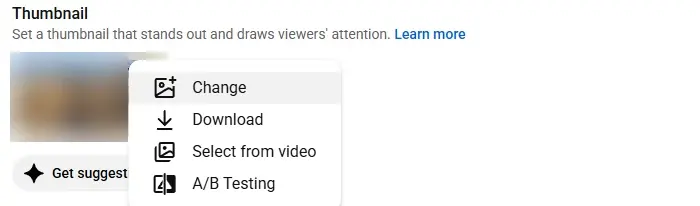
- 1Change: upload a new image
- 2Select from video: pick a frame instead
- 3A/B Testing: compare up to three
The same menu has Download, which saves the current thumbnail, and Select from video, which lets you pick any frame from the video. Get suggestions, under the thumbnail, offers thumbnails YouTube generates for you.
You can also set the thumbnail while uploading, on the Details step. Our guide to uploading a YouTube video walks through every screen of that process.
Shorts thumbnails
A Short's thumbnail is vertical, so the specs flip: 9:16, ideally 2160 × 3840 pixels, at least 640 pixels high. YouTube Help says custom Shorts thumbnails can only be added in YouTube Studio on a computer, and need the same account verification:
- In YouTube Studio, select Content, then the Shorts tab.
- Open the Short you want to edit.
- Under Thumbnail, click Upload file and choose a 9:16 image.
- Click Save.
Every size YouTube stores for a video
Once a video is published, YouTube generates several copies of its thumbnail at fixed sizes. These are the files public pages, embeds and link previews load:
Three of the five are 4:3 with black bars added above and below, which is why a downloaded thumbnail sometimes looks letterboxed. The 1280 × 720 file only exists when the original upload was large enough. When it's missing, YouTube returns a grey placeholder instead.
The Thumbnail Downloader shows all five for any public video, with their real dimensions, so you can see which exist before you save one. Here it is on a video from YouTube's own channel:
It's useful for checking your own published thumbnail at the sizes viewers really see, or for studying how other channels in your niche design theirs. Other creators' thumbnails are their copyrighted work, so use them as reference, not as material to republish.
Test up to three thumbnails
YouTube Studio can test thumbnails against each other for you. Its A/B Testing feature, which YouTube Help calls "Test & compare", runs up to three thumbnails on the same video, or three titles, or three title and thumbnail pairs (YouTube Help).
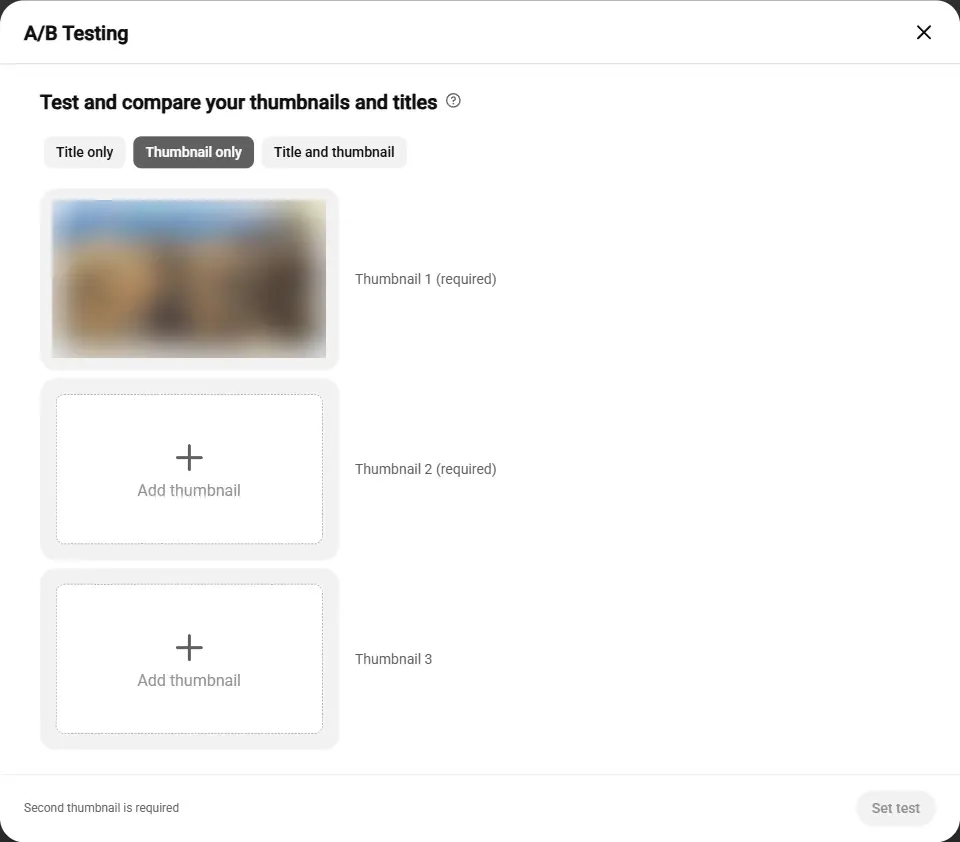
- 1Test thumbnails only
- 2Your current thumbnail
- 3Up to two more to compare
What to know before you start a test:
- The winner is picked by watch time, not clicks. YouTube shows the option with the highest share of watch time to everyone once the test ends.
- Tests take up to two weeks. Results are Winner, Performed Same or Inconclusive. If inconclusive, the first thumbnail you uploaded stays.
- Keep every option at 1280 × 720 or larger. YouTube Help says that if any thumbnail in a test is lower than 720p, all of them are downscaled to 854 × 480. One small file lowers the quality of the whole test.
- Not every video qualifies. You need advanced features turned on, and tests can't run on videos that are made for kids, for mature audiences, or private, or on Shorts.
Testing titles works the same way. Our guide to writing YouTube titles covers what to test and why.
What a thumbnail can't show
Thumbnails follow YouTube's Community Guidelines like the video itself. YouTube Help says thumbnails with nudity or sexually provocative content, hate speech, violence, or harmful or dangerous content can be removed and lead to a strike. Repeat problems can remove your ability to add custom thumbnails for 30 days (YouTube Help).
A thumbnail also counts toward YouTube's spam and deceptive practices policy, which prohibits "maliciously misleading" thumbnails that promise something the video doesn't deliver (YouTube Help). A dramatic image is fine; one showing content that isn't in the video is not.
Common thumbnail problems and fixes
A thumbnail and a title work as a pair: the image earns the glance, and the title confirms what the video is. Once both are set, paste the video's link into the Video SEO Checker to check the rest of its metadata, and see whether tags still matter for your topic.