

Yes, but only a little. YouTube says tags play a minimal role in how viewers find a video, and that your title, thumbnail and description matter more. Tags are still worth a minute per upload, mainly for words people often misspell and for alternative names. Just don't expect them to rank a video by themselves.
This blog covers what YouTube says about tags, how they differ from hashtags, how to add them in YouTube Studio, how the 500-character limit is really counted, which tags are worth adding, and the mistakes that break YouTube's policies.
What YouTube says about tags
YouTube's Help Center is direct about it: tags are descriptive keywords that give extra context about a video, they "play a minimal role in your video's discovery", and the title, thumbnail and description are more important (YouTube Help).
It names one situation where tags earn their place: when "the content of your video is commonly misspelled". YouTube Studio repeats the same advice right above the Tags box, as you'll see in the screenshot below.
That's the honest baseline for everything that follows. Tags won't rescue a video with a vague title, and a strong video won't fail because it has no tags. They're a small finishing touch, not a strategy.
Tags vs hashtags
Tags and hashtags sound alike but work differently (YouTube Help: hashtags):
Both are optional, and neither replaces a clear title. If you want hashtags as well, the Hashtag Generator builds a set from broad to specific.
How to add tags in YouTube Studio
Tags are hidden behind a button on the upload screen, which is why many creators never find them.
- In YouTube Studio, start an upload, or open Content and click an existing video.
- On the Details page, scroll down and click Show more.
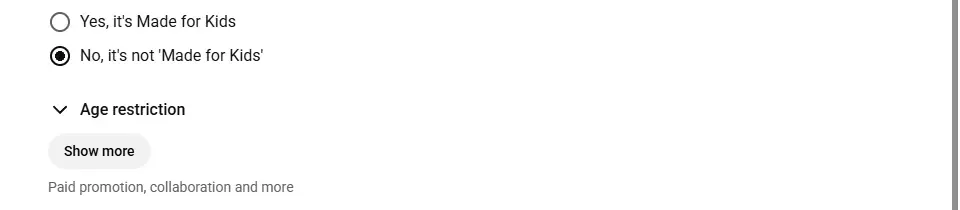
- 1Show more opens the Tags box
- Scroll to Tags. Type a tag and enter a comma after it; each one turns into a chip.
- Save, or carry on with the upload.
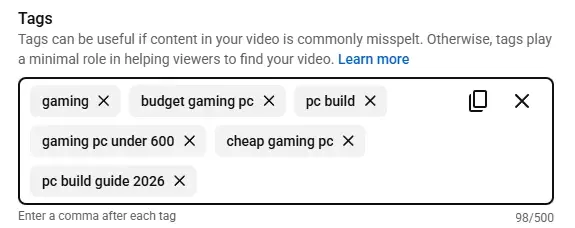
- 1YouTube's own note: tags play a minimal role
- 2Each tag becomes a chip
- 398 of 500 characters used
You can change tags at any time after publishing, and you can also edit them in the YouTube app.
The 500-character limit, and how it's counted
The Tags box holds 500 characters in total, not a set number of tags. YouTube's Help Center doesn't explain how they're counted, so we watched Studio's counter while adding the tags above one at a time:
So the rule is: each tag counts its letters and spaces, a tag with a space in it costs 2 more (Studio wraps it in quotes behind the scenes), and every tag after the first adds 1 for the comma. Long multi-word tags fill the box faster than they look.
Go over 500 and Studio stops you. The counter and the Tags box turn red, the Details step shows an error, and the Next button is disabled until you remove tags.
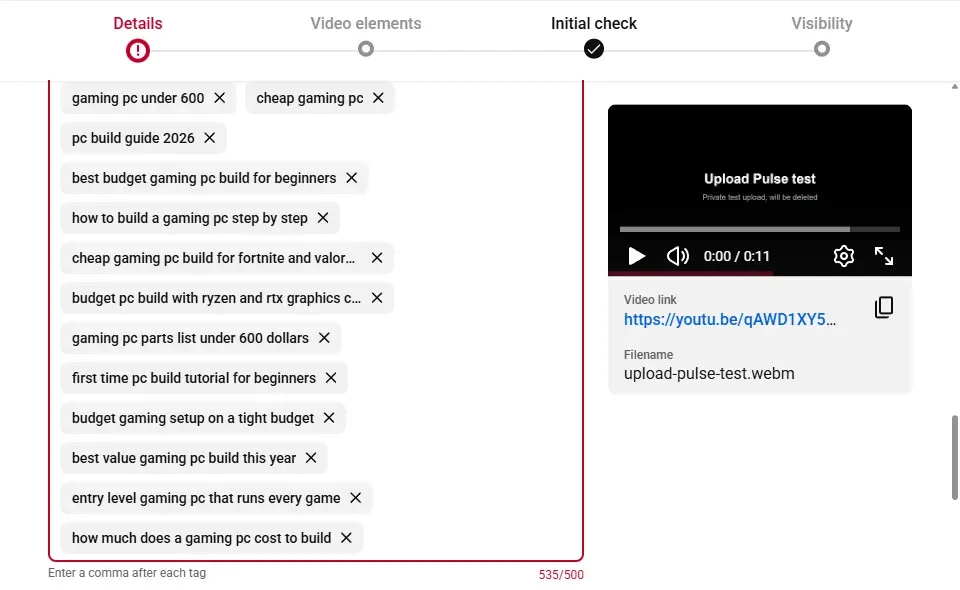
- 1The Details step shows an error
- 2535 of 500: over the limit
In practice, if you're anywhere near 500, you've probably added tags that don't describe the video closely. Put the most specific tags first and stop well before the limit.
Which tags are worth adding
A handful of accurate tags is plenty. These five kinds earn their place:
- Common misspellings. The case YouTube itself highlights. A video about a product or place people often misspell can benefit; a video about Minecraft doesn't need "minecraft".
- Alternative names. Abbreviations, older product names, or a local name alongside the international one.
- The exact topic, in the words viewers would actually type, like "budget gaming pc build" rather than just "pc".
- Close variations of that topic, like "cheap gaming pc" or "gaming pc under 600".
- Your series or channel name, so your own videos are connected to one another.
Stuffing the box with every variation you can think of doesn't add relevance. It just adds noise.
Generate tags without guessing
The quickest way to find the words viewers actually use is to start from what they type into YouTube search. The AI Tag Generator takes your title or topic, pulls YouTube's own search suggestions for it, adds close variations, scores every tag out of 100, and pre-selects a set that leaves room inside the 500 characters:
The counter in the tool uses the same rule as Studio's (quotes and commas included), so a set that fits in the tool fits in Studio. Read the list before you copy it, and remove any tag that doesn't describe your video.
Look at what other creators tag
Tags aren't shown on the watch page, but they're part of a video's public data. Looking at the tags on well-performing videos in your niche is a useful research exercise, with one caveat: use it to learn the vocabulary, not to copy.
Seeing tags across several videos shows you the words creators in your niche use, alternative names and spellings you hadn't thought of, and how specific successful creators tend to be. The Tag Extractor shows any public video's tags in the order the creator set them.
What you shouldn't do is copy another creator's tag list wholesale. Their tags describe their video. If yours is different, those tags become exactly the kind of misleading metadata YouTube's policies warn about.
Mistakes that break YouTube's policies
Tags are low-reward, but they aren't zero-risk. YouTube's Help Center says "adding excessive tags to your video description is against our policies on spam, deceptive practices, and scams" (YouTube Help). Avoid:
- Pasting long lists of keywords into the description. This is the case YouTube explicitly calls out.
- Tags that don't describe the video, added only because a topic is trending.
- Other creators' names or channel names, unless your video is genuinely about them.
- Repeating the same word in many variations just to fill space.
The rule of thumb is simple: every tag should be something a viewer would agree the video is about.
A 2-minute tagging routine
For each upload:
- Write the title and description first. They matter more.
- Add the one or two phrases that best describe the specific topic.
- Add any common misspellings or alternative names.
- Add your series or channel name if you use one.
- Read the list back and delete anything the video isn't really about.
That's it. Tags work best as a quiet finishing step, done accurately, rather than something to agonise over. Our guide on how to upload a YouTube video shows where they fit among the other upload settings.