

Views on YouTube come from three places: search, the home page and suggested videos next to whatever someone is watching. To get more of them, make each video easy to find, then make it worth clicking and worth finishing. The first part is YouTube SEO, and most of it happens on one screen while you upload. The second part is your title, thumbnail and the video itself.
This blog explains where views come from, what YouTube says decides which videos it shows, and how to SEO a video field by field while you upload it. It uses real YouTube Studio numbers from a small gaming channel we run for testing, so you can see what search traffic looks like before a channel has an audience. If you've never uploaded before, start with our step-by-step guide on how to upload a YouTube video.
Where YouTube views come from
YouTube Studio groups views by traffic source. Three of them carry most channels:
- YouTube search. Someone types a query and picks your video from the results.
- Browse features. Mostly the home page, plus the subscriptions feed. YouTube calls the home page "primarily a personalized surface", built mainly from each viewer's watch history (YouTube Help).
- Suggested videos. The "Up next" list beside or below another video. Here the main signal is the video being watched.
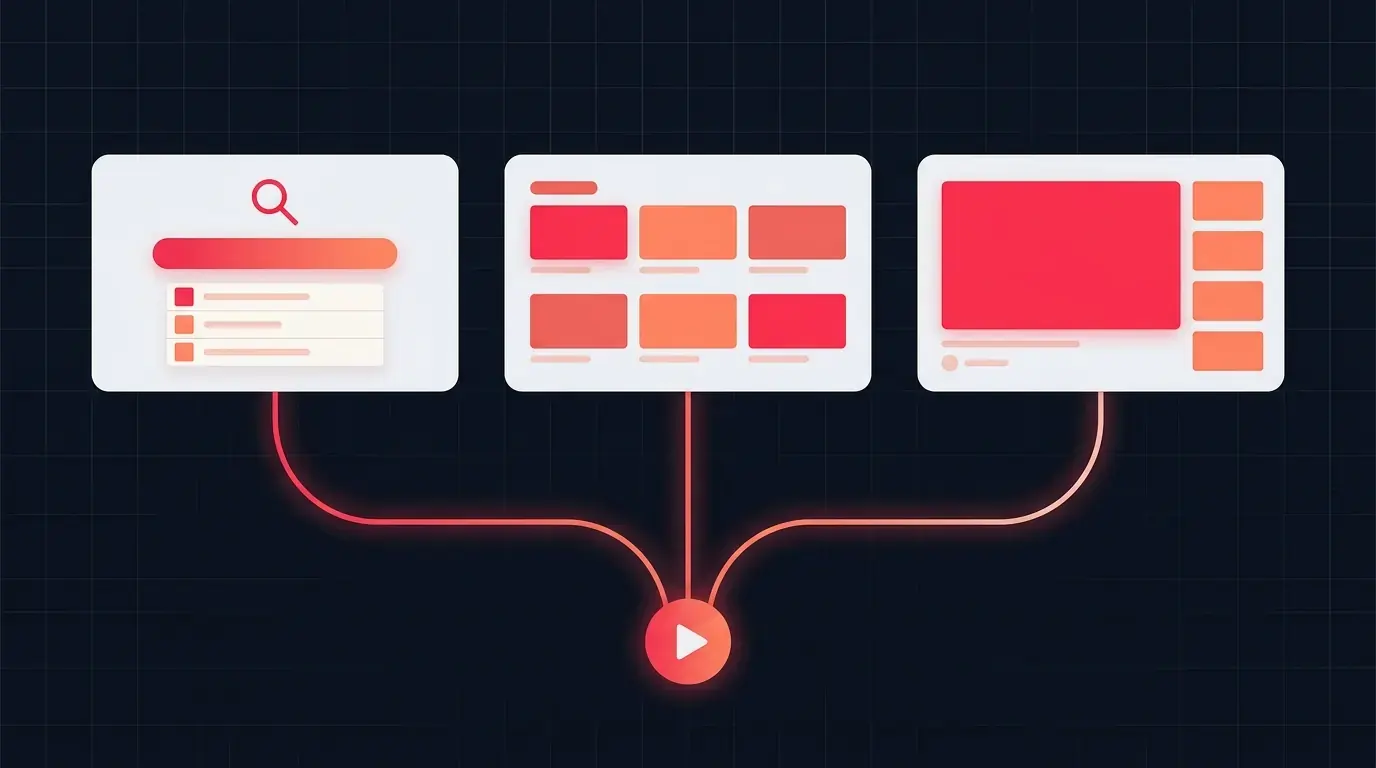
Across YouTube as a whole, recommendations matter most. YouTube's own explainer on its recommendation system says recommendations drive more viewing than channel subscriptions or search (YouTube Official Blog, 2021).
A new channel sees it the other way round. On our test channel, which has 19 subscribers, 90.2% of all views in the last 28 days came from YouTube search. The breakdown for its best-performing video, since it was published, looks like this:
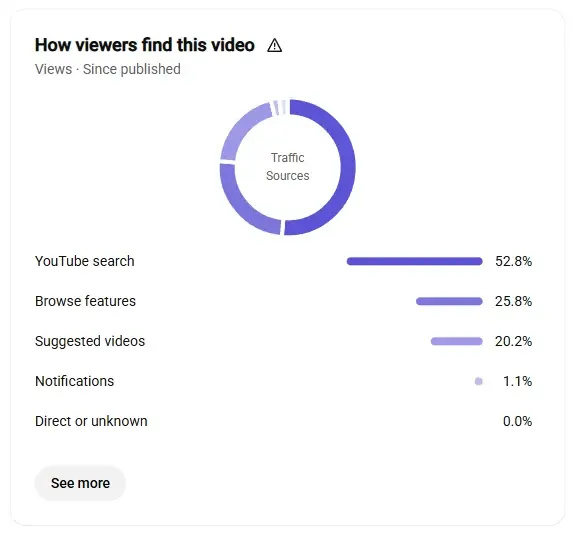
- 1YouTube search: 52.8% of views
- 2Browse features (home page): 25.8%
- 3Suggested videos: 20.2%
That's the pattern to aim for. Search brings the first viewers, because it doesn't need subscribers. Once those viewers click and keep watching, YouTube starts showing the video on the home page and next to related videos, and those sources grow. Good SEO is how a small channel gets the first push.
What YouTube says decides which videos it shows
YouTube publishes the basics, and they're worth reading in its own words before you trust anyone's "secret algorithm" advice.
Search weighs three things (YouTube Help):
- Relevance. How well "the title, tags, description, and video content match your search query".
- Engagement. Signals such as how long people watch a video after searching for a query.
- Quality. Which channels show "expertise, authoritativeness, and trustworthiness on a given topic".
Results are also personalized by a viewer's search and watch history, and they aren't simply a list of the most-viewed videos for a query (YouTube Help).
Recommendations lean on viewer behavior. YouTube says a click is a strong hint that someone will find a video satisfying, but that clicks alone can mislead when a title promises more than the video delivers. It also weighs watch time, likes, shares, dislikes and survey responses. When YouTube first added watch time to recommendations, it saw an immediate 20% drop in views, and kept the change anyway because viewers were more satisfied (YouTube Official Blog).
Put together, the split is simple. Metadata decides whether YouTube understands your video and considers it. Viewers decide whether it spreads. SEO is the part you fully control, so it's the right place to start, but a title that over-promises wins clicks that YouTube's systems then learn to discount.
Before you upload: find what people search for
The best SEO happens before you film: pick a topic people already search for, and use the words they use.
YouTube Studio has a built-in tool for this. Go to Analytics, then the Trends tab (called Research on some accounts), and search for a topic. You'll see what viewers are watching on it, and on larger channels, what they search for and where there are content gaps. YouTube defines a content gap as a search where "viewers can't find enough quality search results" (YouTube Help). Those are the easiest searches to win.
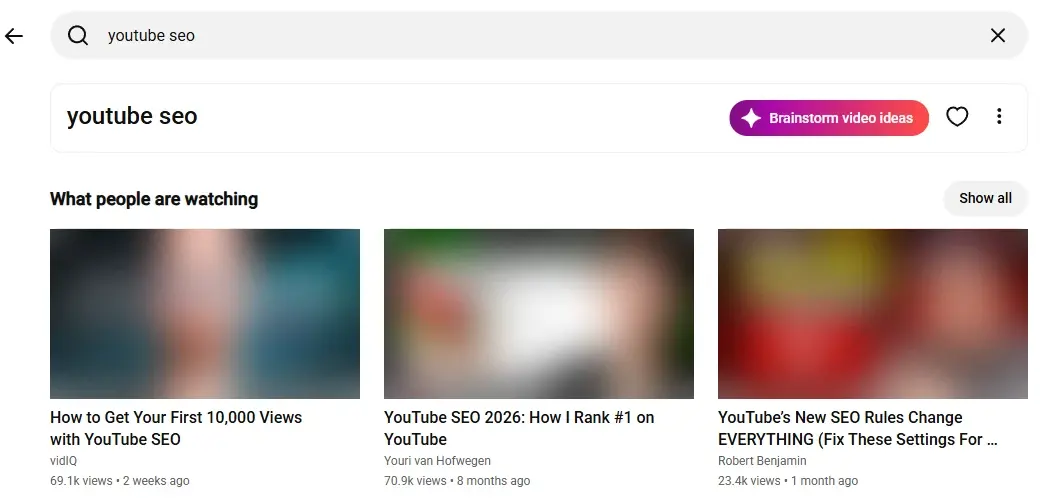
- 1Search any topic
- 2Brainstorm video ideas with AI
- 3What viewers are watching on that topic now
Two more free sources are worth a minute:
- YouTube's search box. Start typing your topic and read the suggestions. They're built from real searches, and they show you the exact wording people use.
- The videos that already rank. Search your phrase and look at the top results. If they're all ten-minute tutorials, a 40-second clip probably isn't what searchers want. If they're old or don't quite answer the question, that's your opening.
Then choose one main phrase per video, such as "how to clean a cast iron pan" rather than "cooking tips". Everything in the next section builds on it.
How to SEO a video while you upload it
Every SEO field lives on the Details page, both during the upload and afterwards when you open a video in YouTube Studio. Here's the Details page for our test channel's top video. To keep the channel private, we've rewritten its title and description as a worked example of the advice below, and blurred the thumbnail and link:
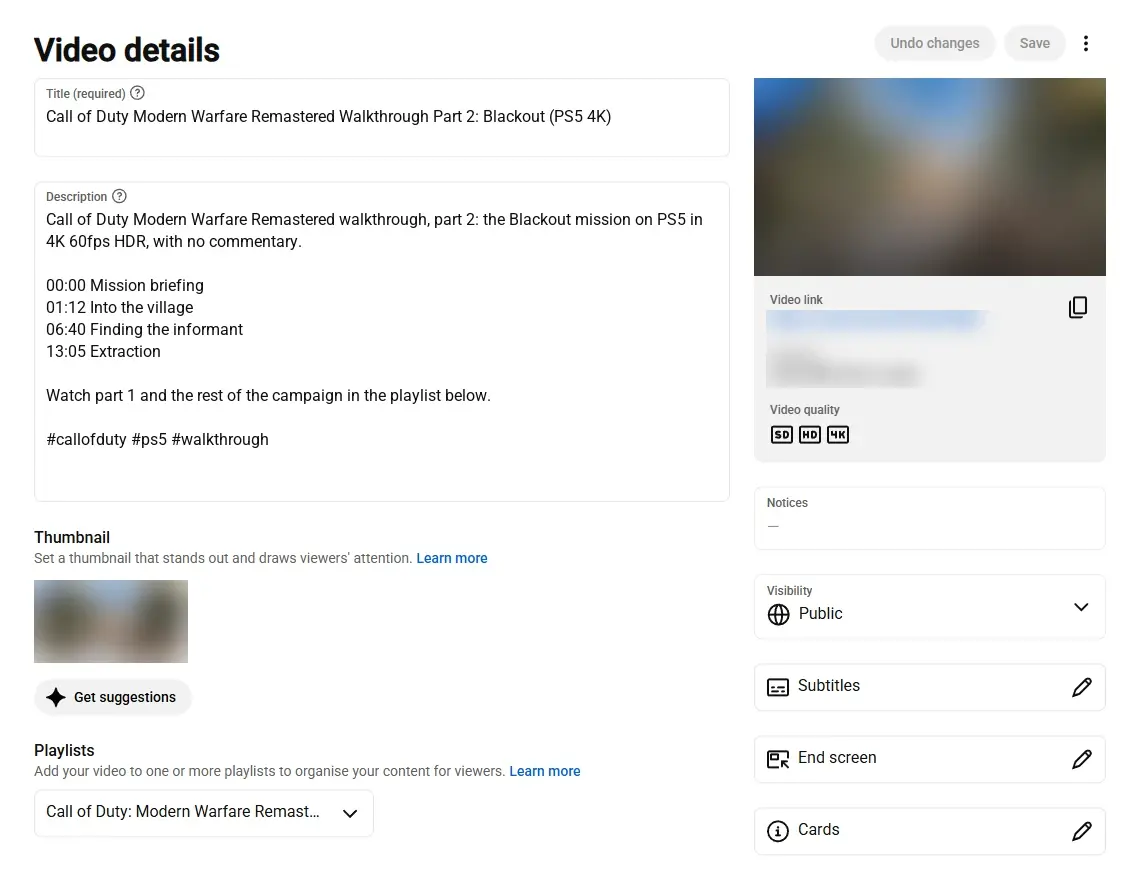
- 1Title: the search phrase first, then the specifics
- 2Description: what the video is, in the first lines
- 3Chapters: timestamps starting at 00:00
- 4Hashtags, at the end of the description
- 5Thumbnail
- 6Subtitles, end screen and cards
An SEO pass for every upload
- Step 1Pick the phraseOne search phrase per video, in the words viewers use.
- Step 2Title and thumbnailPhrase near the start of the title; a thumbnail that matches it.
- Step 3Description and settingsA specific opening, chapters, the video language and checked captions.
- Step 4Check and measureScore the metadata, then watch CTR and view duration.
Title: lead with the phrase people search for
The title is one of the relevance signals YouTube names, and the first thing a viewer reads. It can be up to 100 characters, but only about the first 60 reliably show on phones, so put your search phrase at the start and the hook after it.
Our test video shows why. The single biggest search term behind its views was, almost word for word, the phrase at the start of its title. In the screenshot below we've swapped that phrase for the example phrase from the title above, to keep the channel private; the percentages are real.
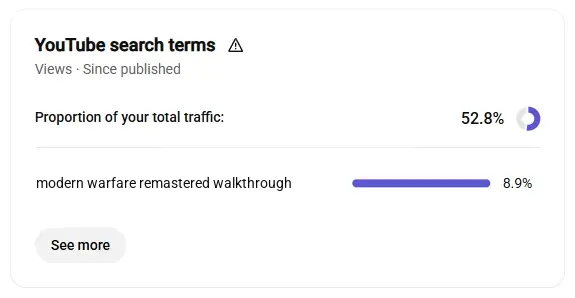
- 1Search: 52.8% of this video's views
- 2Top term: the phrase at the start of the title
A good SEO title still has to earn the click. "Modern Warfare Remastered Walkthrough Part 2: Blackout" works because it opens with the search phrase, then says exactly which part of the game you'll see. Compare "Gameplay Part 2", which matches nothing anyone searches. Our guide on how to write YouTube titles covers length, characters YouTube rejects and A/B testing. If you're stuck, the AI Title Generator suggests ten titles built on real YouTube searches, each scored out of 100.
Thumbnail: the other half of the click
Search gets your video shown; the thumbnail and title together decide whether anyone clicks. YouTube counts an impression when at least 50% of your thumbnail is on screen for more than one second, in places such as search, the home page and Up next (YouTube Help). Click-through rate (CTR) is the share of those impressions that become views.
Make the thumbnail readable at phone size, and make it agree with the title rather than repeat it. Custom thumbnails need a phone-verified account; our YouTube thumbnail size guide covers every spec.
Description: say what the video is, early
Search uses the description to judge relevance, and viewers see its first lines before they expand it. Open with a sentence or two that say what the video is about, using your search phrase once, naturally. After that, add useful detail: what's covered, links to related videos and anything you mention on screen. The limit is 5,000 characters.
Don't paste lists of keywords or other creators' names into it. YouTube says "adding excessive tags to your video description is against our policies on spam, deceptive practices, and scams" (YouTube Help), and its spam rules also forbid "maliciously misleading titles, thumbnails, descriptions" (YouTube Help).
Chapters: timestamps that also describe the video
Add timestamps to the description, starting at 00:00, and YouTube turns them into chapters on the progress bar. Each chapter title is another short, plain description of what's in the video, and chapters help viewers jump to the part they searched for. Our guide on how to add chapters to YouTube videos covers the rules that make them appear.
Tags and hashtags: small, but worth a minute
YouTube says tags play a "minimal role" in discovery and are most useful when your topic is often misspelled (YouTube Help). Add your main phrase, its common misspellings and alternative names, and stop there. Our guide on whether YouTube tags still matter explains the 500-character limit, and the Tag Generator builds a scored set that fits it.
Hashtags are visible and clickable. Up to three can appear above your title, and if a video has more than 60, YouTube ignores all of them (YouTube Help). Two or three relevant ones are plenty; the Hashtag Generator suggests a set from broad to specific.
Language and captions: tell YouTube who the video is for
Click Show more on the Details page and set the video language. It tells YouTube which viewers the video suits, and it decides which language automatic captions are generated in.
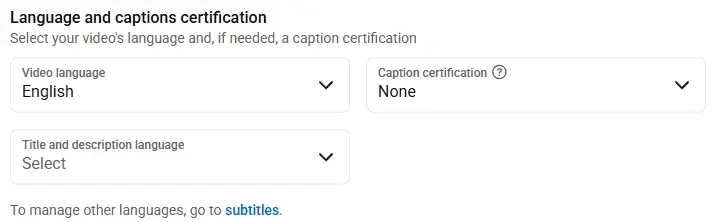
- 1Video language
- 2Language of the title and description
Then open Subtitles and check the automatic captions, correcting names and terms they get wrong. Captions let deaf and hard-of-hearing viewers and people who speak other languages follow your video (YouTube Help). If a large part of your audience speaks another language, you can add a translated title and description from the same Subtitles page, so the video shows in their language in search.
While you're under Show more, pick the right category too. It's a small extra hint about what the video is.
Playlists, end screens and cards: turn one view into several
These don't help a video get found, but they keep viewers watching your channel once they arrive, which makes each new viewer worth more.
- Playlists. Add every video to at least one. A series in a playlist plays on into the next episode.
- End screens. Add them in the last 5 to 20 seconds of a video that's at least 25 seconds long, with up to four elements (YouTube Help). Point to the video a viewer is most likely to want next.
- Cards. Link to a related video at the moment you mention it.
Check your metadata before the video goes live
It's easy to miss a field when you're rushing to publish. Once the video is up, even as unlisted, paste its link into the Video SEO Checker. It scores the title, description, tags, hashtags and thumbnail out of 100 and lists the fixes in order of points gained.
Treat the score as a checklist, not a ranking prediction. A perfect score means nothing is missing; it can't tell you whether the title is compelling or the video holds attention. For a whole channel, the Channel SEO Checker audits the channel's About text, keywords, playlists and recent uploads in the same way.
After you publish: the three numbers to watch
A few days after publishing, open the video in YouTube Studio, click Analytics, then Reach. The card at the bottom right shows how impressions turned into views and watch time:
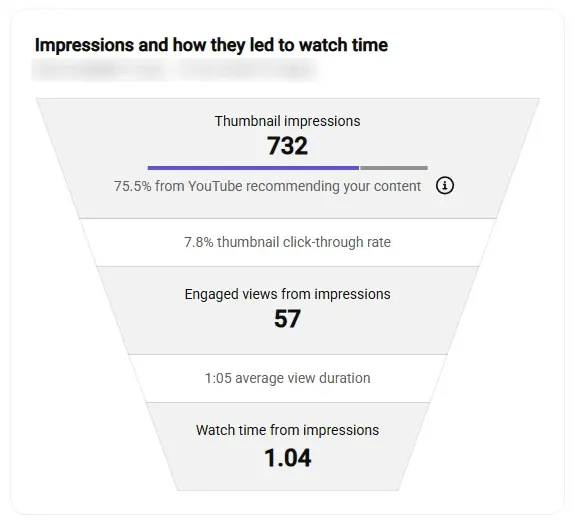
- 1Impressions: how often the thumbnail was shown
- 2Click-through rate: the title and thumbnail
- 3Average view duration: the video itself
Read it from the top down:
Compare each number with your own channel's other videos rather than a universal target. YouTube notes that CTR naturally falls when a video starts getting lots of impressions from the home page, so a dip alongside rising impressions is usually good news.
If a video is underperforming, fix it in place. Titles, descriptions and thumbnails can all be changed after publishing without re-uploading, and A/B Testing on the Details page can compare up to three titles or thumbnails on the same video (YouTube Help).
Mistakes that cost views
None of this replaces a video people want to watch. What SEO does is make sure the right people get the chance to find it. Pick the phrase, put it at the start of the title, describe the video plainly, and then let the Reach tab tell you what to fix next.