To monetize a YouTube channel you need to join the YouTube Partner Program (YPP), and it has two tiers. Fan funding (memberships, Super Chat and Shopping) starts at 500 subscribers. Ad revenue starts at 1,000 subscribers plus either 4,000 watch hours in 12 months or 10 million Shorts views in 90 days. If it's your own channel, the Earn page in YouTube Studio shows exactly how close you are. For anyone else's channel, only part of the picture is public.
This blog covers both tiers, the requirements beyond the numbers, how to check your own channel and someone else's, how applying and review work, the changes coming on 1 February 2027, and why channels that meet the numbers still get rejected.
The two tiers at a glance
You need the subscriber count and one of the two paths, watch hours or Shorts views, for the tier you're applying to (YouTube Help, expanded YPP):
Here's how the fan-funding tier looks on the Earn page in YouTube Studio for a small channel. Its own figures are on the left and YouTube's thresholds on the right:
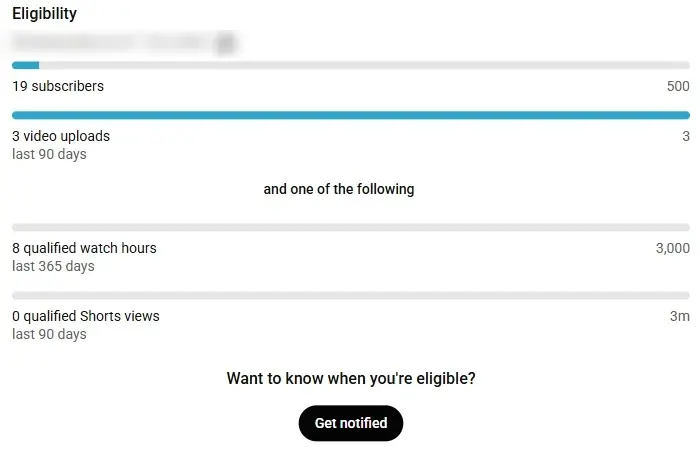
- 1500 subscribers
- 23 public uploads in the last 90 days
- 33,000 watch hours in the last 365 days
- 4Or 3 million Shorts views in the last 90 days
Fan funding is only available in countries where YouTube offers it, and the exact features vary by region. YouTube Studio always shows the version that applies to your channel. Members' payments are worth a look: YouTube Studio says creators receive 70% of net revenue from channel memberships.
Requirements beyond the numbers
Hitting the thresholds makes a channel eligible to apply. To actually get in, YouTube also requires you to (YouTube Help):
- Follow YouTube's channel monetization policies, which include the Community Guidelines, Terms of Service, copyright rules and AdSense program policies.
- Live in a country or region where the Partner Program is available.
- Have no active Community Guidelines strikes.
- Turn on 2-Step Verification for the Google Account that owns the channel.
- Have advanced features turned on. This needs phone verification plus either some channel history or ID verification.
- Link one active AdSense for YouTube account so you can be paid.
Advanced features are easy to overlook. You can check yours in YouTube Studio under Settings → Channel → Feature eligibility. YouTube describes the third level as "eligibility to apply for monetisation".
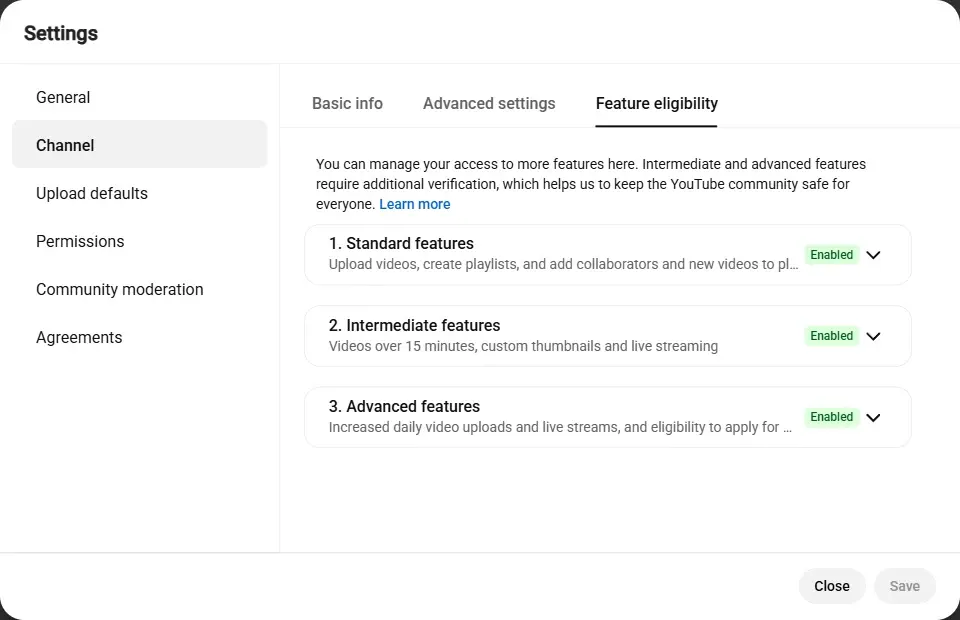
- 1Settings → Channel
- 2The Feature eligibility tab
- 3Advanced features: required to apply
Staying active matters after you're in, too. YouTube may turn monetization off for a channel that hasn't uploaded or posted in 6 months or more.
How to check your own channel
If it's your channel, you don't need to estimate anything. YouTube Studio shows your exact progress.
- Sign in to YouTube Studio.
- Select Earn in the left-hand menu.
- Find the Eligibility section for each tier. Your figures appear on the left, YouTube's thresholds on the right, with a progress bar for each.
- When you meet a tier, the same page shows Apply now.
The ad revenue tier has its own Eligibility section further down the page:
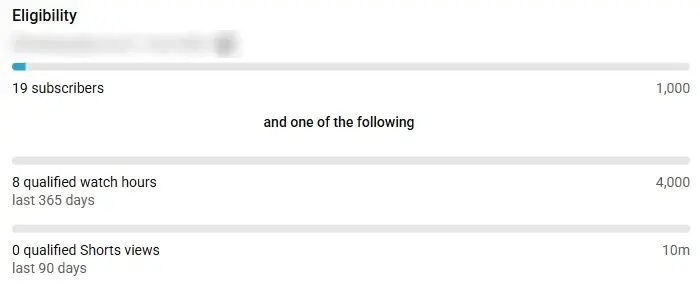
- 11,000 subscribers
- 24,000 watch hours in the last 365 days
- 3Or 10 million Shorts views in the last 90 days
Two details trip people up. First, the counts are qualified figures. Studio says it validates them before they appear, so a recent jump may take a few days to show. Second, they're rolling windows: watch hours cover the last 365 days, so older views drop out as new ones arrive. Short-term swings are normal; check every week or two rather than every day.
How to check someone else's channel
Maybe you're vetting a creator for a sponsorship, researching a competitor, or just curious. From the outside you can't see what YouTube uses to decide, but public data still tells you a lot.
Some features are visible signs a channel is in the program. A Join button for memberships, or Super Thanks on videos, means it's in at least the fan-funding tier. Ads, on the other hand, prove nothing: YouTube's Terms of Service let it show ads on videos from channels that aren't in the Partner Program.
The quickest way to put the public signals together is the Monetization Checker. Paste a channel link or @handle and it checks the public numbers against YouTube's thresholds:
Be clear about what a result like that means. The tool's four checks (1,000+ subscribers, at least 10 uploads, an upload in the last 90 days, a channel older than 30 days) are public signals, two of which are the tool's own sanity checks rather than YouTube rules. "Likely Monetized" means a channel looks ready. It can't confirm a channel has passed review, because watch hours, strikes and the review itself are private.
How applying and review work
Once your Earn page shows you're eligible, applying takes a few minutes:
Applying to the YouTube Partner Program
- Step 1Apply nowOn the Earn page in YouTube Studio, once you meet a tier's thresholds.
- Step 2Accept the termsReview and accept the Base terms, then any modules you want.
- Step 3Link AdSenseSet up or connect one AdSense for YouTube account to be paid.
- Step 4Wait for reviewShows as In progress. Decisions usually take about a month.
Every application is reviewed by automated systems and human reviewers, who look at the channel as a whole rather than a single video. If reviewers disagree, a channel may be reviewed more than once, which is why some decisions take longer.
If you're rejected, you have two options: appeal within 21 days, or keep uploading original content and reapply after 30 days. If it isn't your first rejection, or you've already reapplied once, the wait is 90 days (YouTube Help).
What changes on 1 February 2027
YouTube announced changes to the Partner Program that take effect on 1 February 2027 (YouTube blog, 10 August 2026):
- Higher thresholds for new applicants. To join for ad and Premium revenue, new creators will need 8,000 watch hours in the last 365 days or 20 million Shorts views in the last 90 days, double today's figures. Channels already in the program aren't affected.
- The fan-funding tier doesn't change. Fan funding and Shopping stay at 500 subscribers with 3,000 watch hours or 3 million Shorts views (YouTube Help).
- Shorts revenue gets its own bar. Only channels with at least 10 million Shorts views in the last 90 days will earn Shorts ad and Premium revenue. Channels below that keep earning on long-form videos.
- Existing members must accept new terms. To keep fully monetizing, channels already in the program need to accept the updated terms in YouTube Studio by 31 January 2027.
If your channel is close to today's ad revenue thresholds, applying before February is worth considering. Our full breakdown of the 2027 Partner Program changes covers the new activity rules, what existing partners need to do, and what 8,000 watch hours means in views.
Why channels meet the numbers and still get rejected
The human review asks whether a channel is a good fit for viewers and advertisers. The most common reasons a channel with enough subscribers and watch time doesn't get in fall under two of YouTube's monetization policies (YouTube Help).
Inauthentic content, formerly called repetitious content, is content that looks made from a template or feels repetitive after watching a few videos in a row. YouTube's examples of what isn't allowed include image slideshows or scrolling text with little narrative, and AI-generated videos made from generic templates that give the impression of mass production. A consistent intro and outro is fine, as long as the rest of each video is different.
Reused content means repurposing material already on YouTube or elsewhere without adding significant original commentary, changes, or educational or entertainment value. A critical review that uses clips, or a reaction video where you actually comment, is allowed. Clips from a show edited together with little narrative is not.
The fix for both is the same: make it obvious that the channel's value comes from you. Original footage, your own commentary and a recognisable format all help. Reviewers look at the channel as a whole, so before you apply, go through your most popular and most recent videos the way a stranger would.
A quick eligibility checklist
Before you apply, run through this list:
- Subscribers meet your target tier: 500 or 1,000.
- You meet one path: watch hours in the last 12 months, or Shorts views in the last 90 days.
- For the fan-funding tier, you've published at least 3 public videos in the last 90 days.
- There are no active Community Guidelines strikes on the channel.
- 2-Step Verification is on, and advanced features are enabled.
- Your most-viewed videos are clearly original work.
- You're ready to link an AdSense for YouTube account.
Once you're in, our guide to how much YouTube pays per 1,000 views explains what to expect, and the Earnings Calculator turns your views into a monthly estimate.